NexT will not send record to analytics service provider as long as the page's host name does not match url option set in Hexo config file. This will prevent local debugging from polluting analytics. Make sure you have configured url correctly, otherwise these statistics tools may not work as expected.
Analytics Tools
Google Analytics
Create an account and log into Google Analytics. More detailed documentation
Edit NexT config file and fill
tracking_idunder sectiongoogle_analyticswith your Google track ID. Google track ID always starts withUA-.NexT config file # Google Analytics
google_analytics:
tracking_id: UA-XXXXXXXX-X
only_pageview: false
# only needed if you are using `only_pageview` mode, https://developers.google.com/analytics/devguides/collection/protocol/ga4
measure_protocol_api_secret:When field
only_pageviewis set to true, NexT will only sendpageviewevent to Google Analytics.
The benefit of using this instead ofonly_pageview: falseis reduce a external script on your site, which will give you better performance but no complete analytics function.
Baidu Analytics (China)
Login to Baidu Analytics and locate to site code getting page.
Copy the script ID after hm.js?, like the following picture: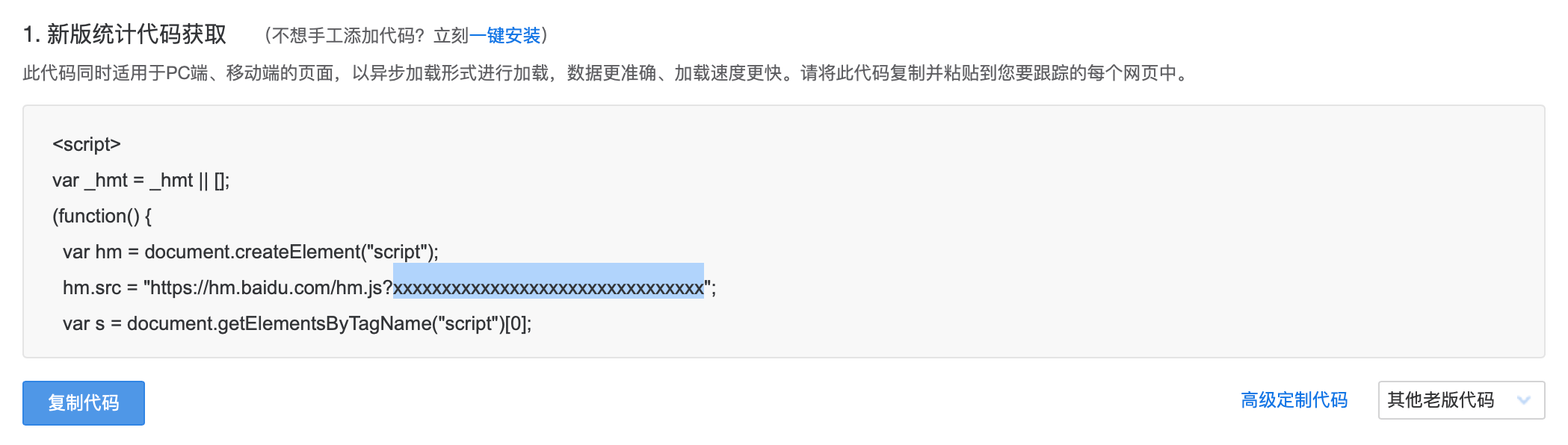
Edit NexT config file and change the value of baidu_analytics to your script ID.
# Baidu Analytics ID |
Cloudflare Web Analytics
Official documentation: https://www.cloudflare.com/web-analytics/
Edit NexT config file and change the value of cloudflare_analytics to your project ID.
# Cloudflare Web Analytics |
Microsoft Clarity Analytics
Official documentation: https://clarity.microsoft.com/
Edit NexT config file and change the value of clarity_analytics to your project ID.
# Microsoft Clarity Analytics |
Matomo Analytics (Self-managed)
Edit NexT config file and fill server_url and site_id under section matomo with the url of your backend server and your customized site ID.
# Matomo Analytics |
Umami Analytics (Self-managed)
Umami is a self-hosted web analytics solution. Official documentation: https://umami.is/
Edit NexT config file. Fill script_url under section umami with your tracking script URL, and change the value of website_id to your website ID.
# Umami Analytics |
Plausible Analytics (Self-managed)
Opt for paid managed hosting or self-host it on your server. Official documentation: https://plausible.io/
Edit NexT config file. Fill script_url under section plausible with your tracking script URL, and change the value of site_domain to your website domain.
# Plausible Analytics |
Counting Tools
Firebase
Cloud Firestore provides the functionality of visitor statistics without loading the Firebase JavaScript SDK.
- Create a Firestore database in Firebase console.
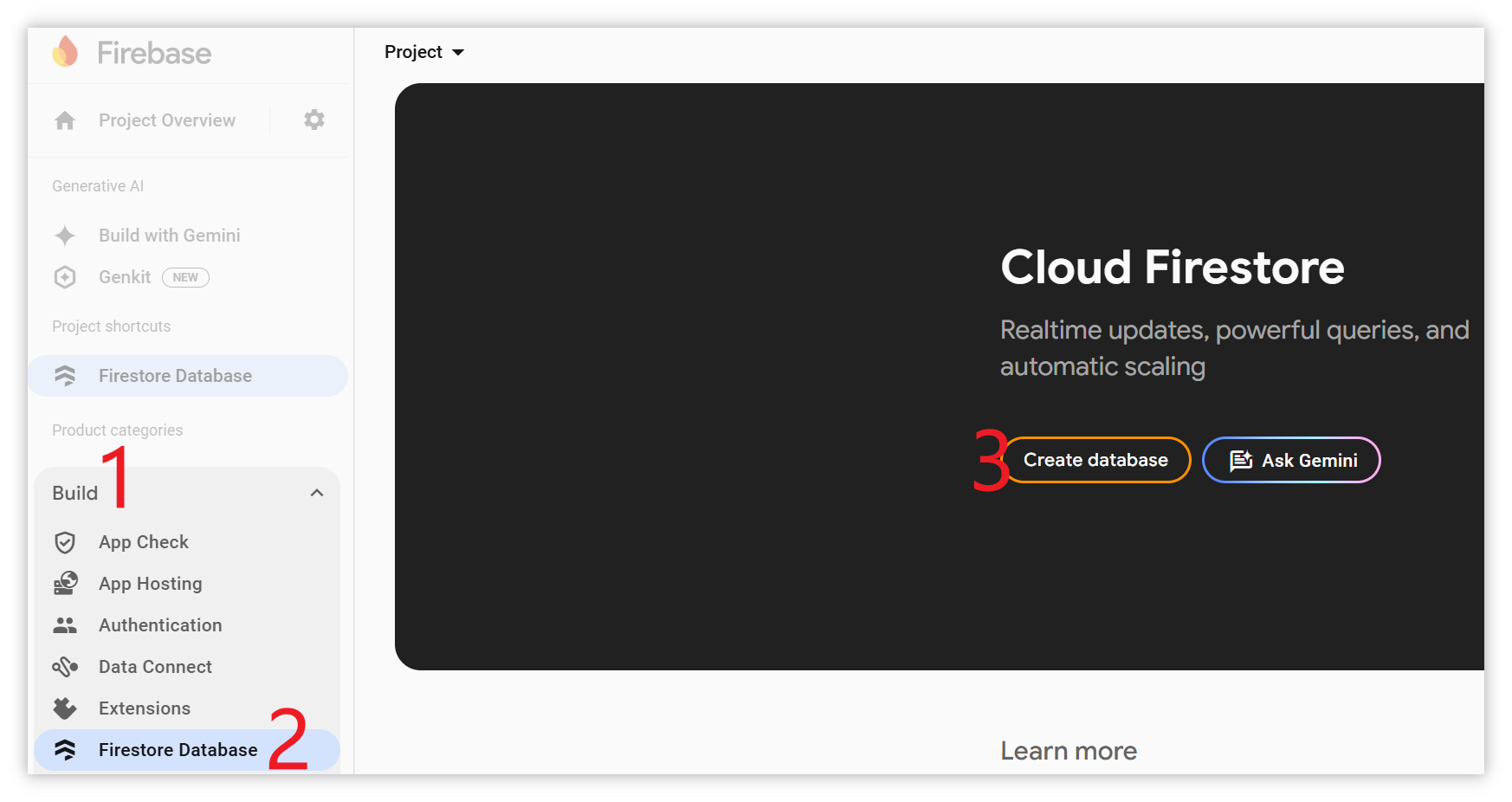
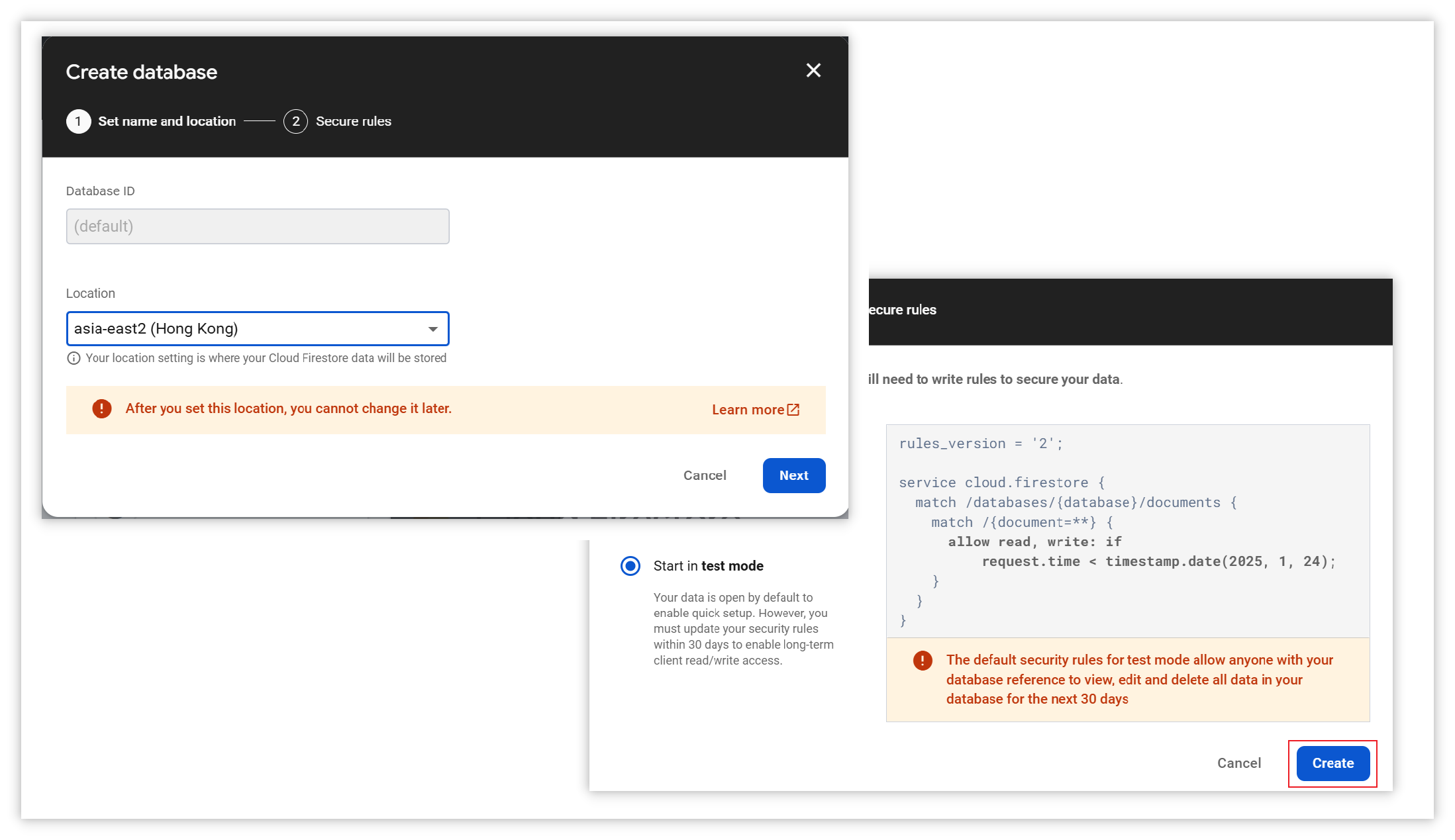
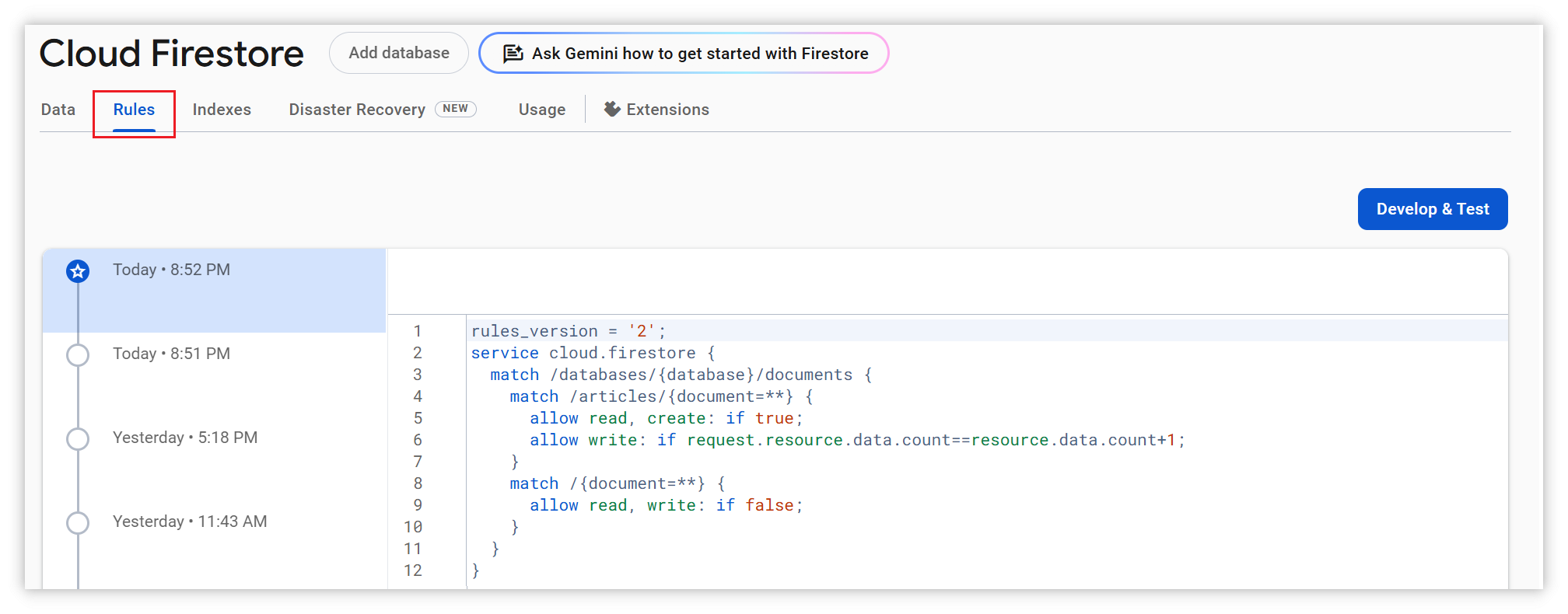
- Apply these rules in Firestore Database Rules:
rules_version = '2'; |
Replace articles if you use a different collection name. These rules allow anonymous reads and count increments while preventing changes to other fields and document deletion. They cannot prevent artificial increments or quota abuse; use a trusted backend if stronger protection is required.
Find your Project ID in Firebase console under Project settings → General, then edit NexT config file and add or change the firestore section:
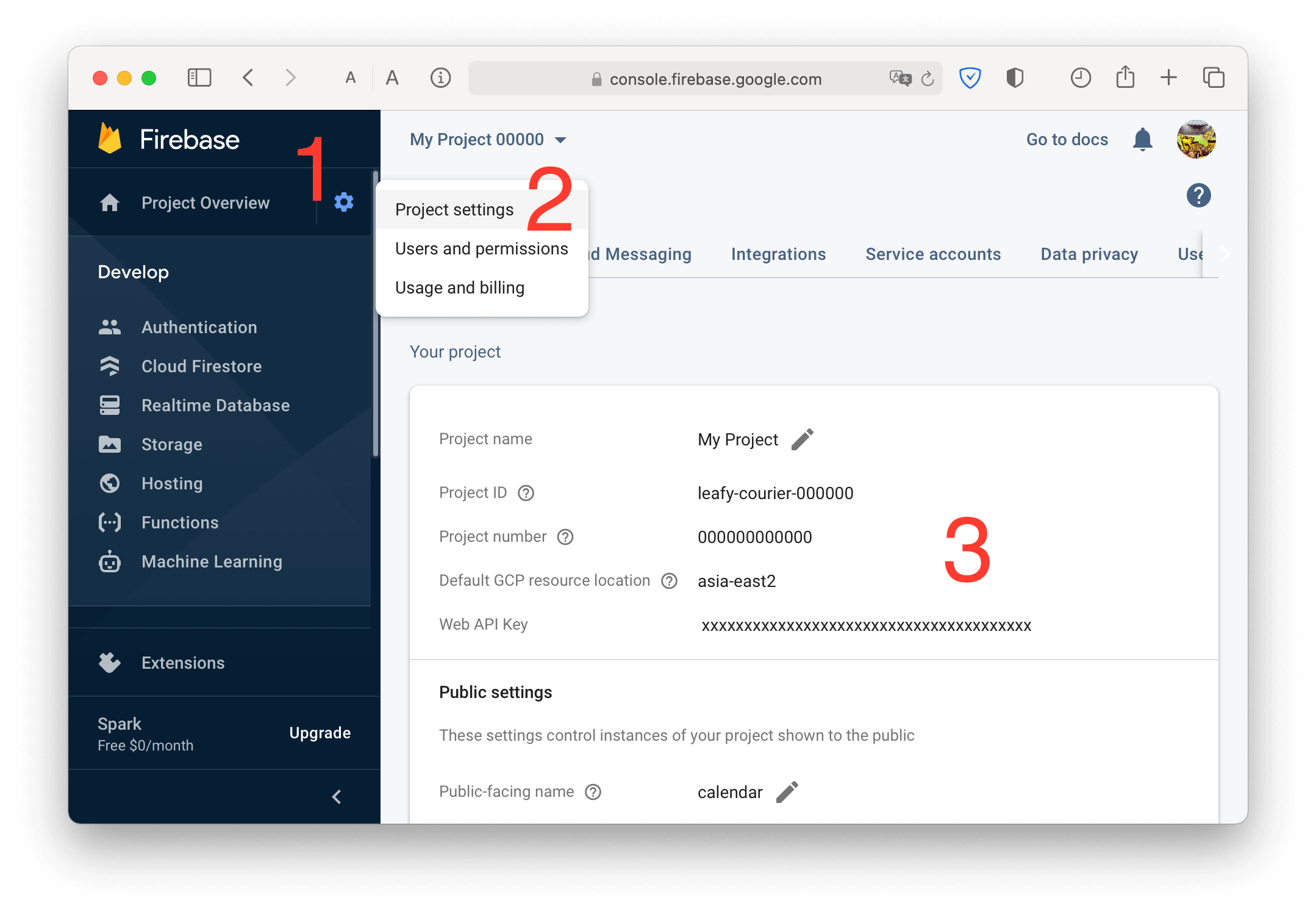
Only the Project ID is required. The Web API Key shown on the same page is not used by NexT.
firestore: |
An API key is not required. NexT uses the Cloud Firestore REST API, and anonymous requests are authorized by your Firestore Security Rules.
Note: Firestore visitor counting records at most one visit per article and browser profile because it uses the browser's localStorage. It is not a reliable unique-visitor metric. To test the counter:
- Clear localStorage in Developer Tools
- Use incognito/private mode
- Use different browsers
Busuanzi Counting (China)
Edit busuanzi_count option in NexT config file.
When enable: true, global setting is enabled. If total_visitors, total_views, post_views are all false, Busuanzi only counts but never shows.
When total_visitors: true, it will show site UV in footer. You can also use font-awesome by setting total_visitors_icon to the name of the icon.
busuanzi_count: |
When total_views: true, it will show site UV in footer. You can also use font-awesome by setting total_views_icon to the name of the icon.
busuanzi_count: |
When post_views: true, it will show page PV in post meta. You can also use font-awesome by setting post_views_icon to the name of the icon.
busuanzi_count: |